How to Correct Payment Entries and Balances
Correct a receipt amount, reduce its allocation first, and void a duplicate payment while retaining history and checking balances.
- ForCompany finance users and administrators who have permission to change the affected Finance transactions
- Task timeAbout 3 min
- Video2:38
- Last checked2026-10-23
Overview
Use Edit transaction, Change allocations and Void whole transaction to correct recorded Finance entries. Follow a receipt reduction and a duplicate supplier payment on one shipment, then verify the resulting balances and retained history. These actions change records in Shiplete; they do not move money.
What you'll learn
- Find a receipt or payment from the Shipment Ledger transaction history
- Reduce an active allocation before lowering a receipt total
- Recognize the temporary Shipment advance created by reducing an allocation
- Void a duplicate payment and understand the whole-transaction warning
- Verify corrected balances and retained transaction history
Before you begin
- Access to Payments and permission to change Finance transactions for the affected scope; view-only access is insufficient
- An existing recorded receipt or payment and evidence of the intended amount or duplicate
- Know which shipment and customer or supplier the record belongs to Understand Shipment Overview
Step-by-step guide
Find the receipt that needs correcting
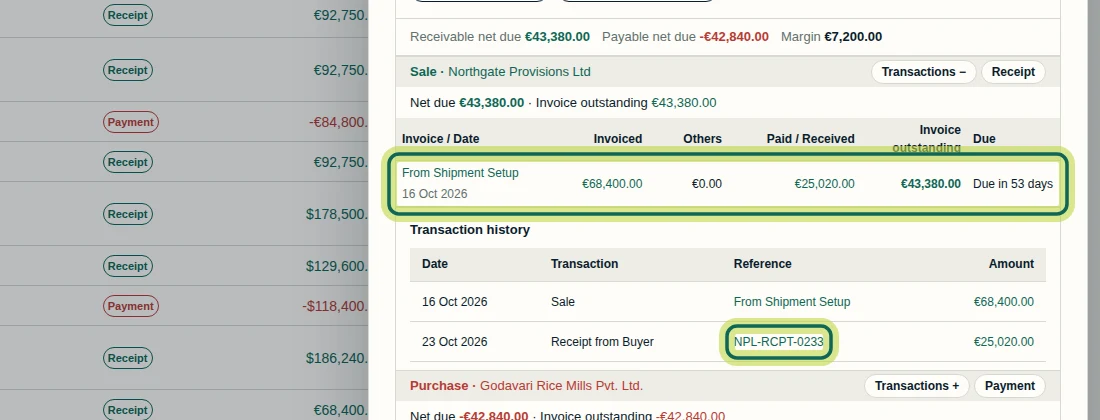
In Payments, select the shipment name to open Shipment Ledger. Expand Transactions + on the Sale section, then select the receipt reference. This example uses NPL-RCPT-0233 for Northgate Provisions Ltd: 25,020.00 euros was recorded instead of 20,520.00 euros, leaving Invoice outstanding at 43,380.00 euros. Verify the intended amount against your own payment evidence. You need permission to change Finance transactions for the affected scope; viewing a ledger alone does not grant that permission. A recorded receipt is a record in Shiplete; recording or correcting it does not move money.
Step 1 Check the limit before reducing the total
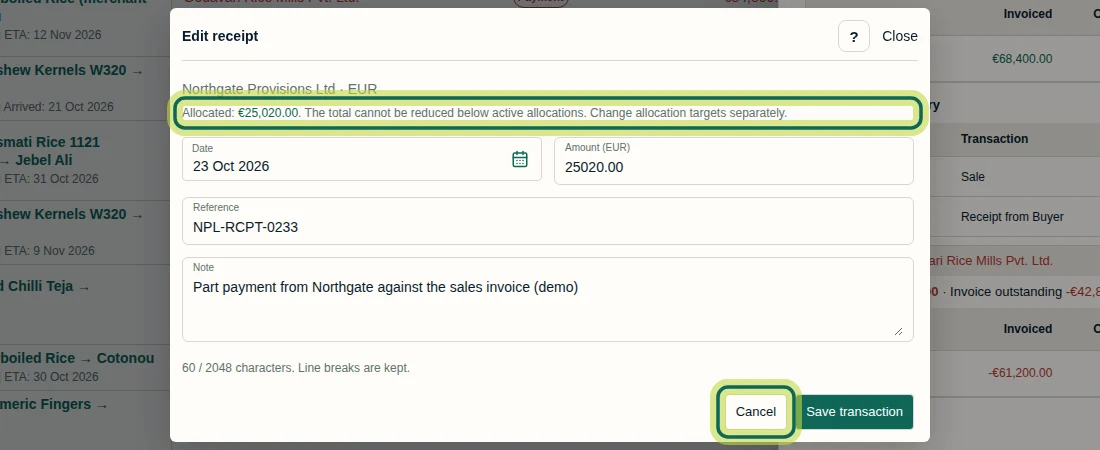
In the receipt details, select Edit transaction. The Edit receipt warning says: Allocated: 25,020.00 euros. The total cannot be reduced below active allocations. Change allocation targets separately. Because the intended 20,520.00 euros total is below that allocation, select Cancel, then Change allocations in the receipt details. The edit form changes Date, Amount (euros), Reference and Note; it does not change the Party, payment direction or currency.
Step 2 Reduce the invoice allocation first
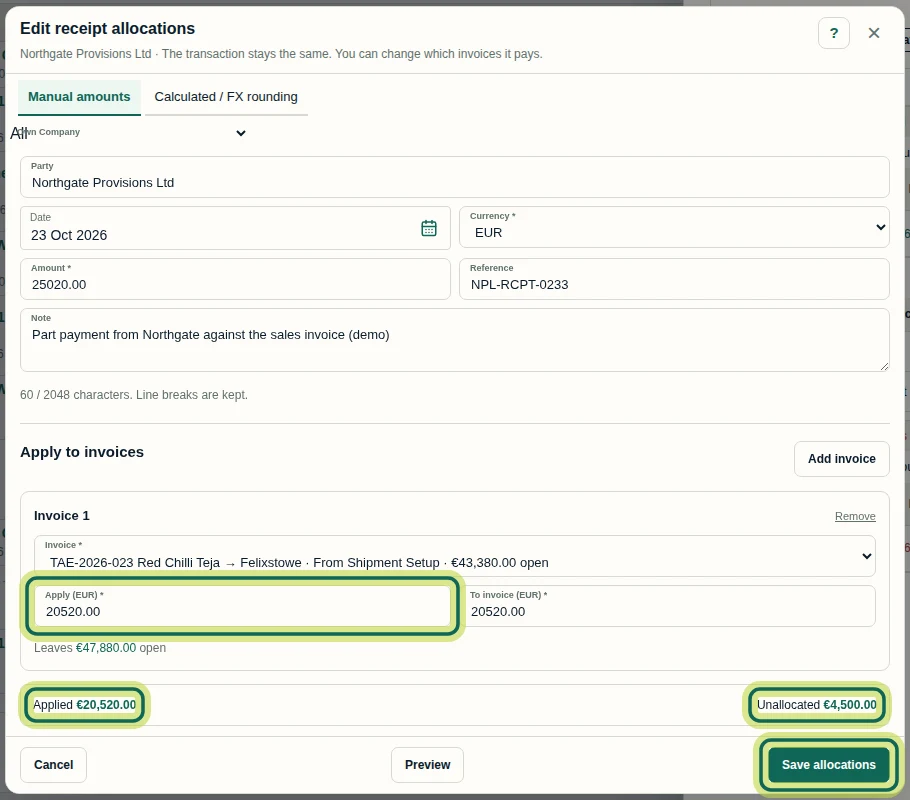
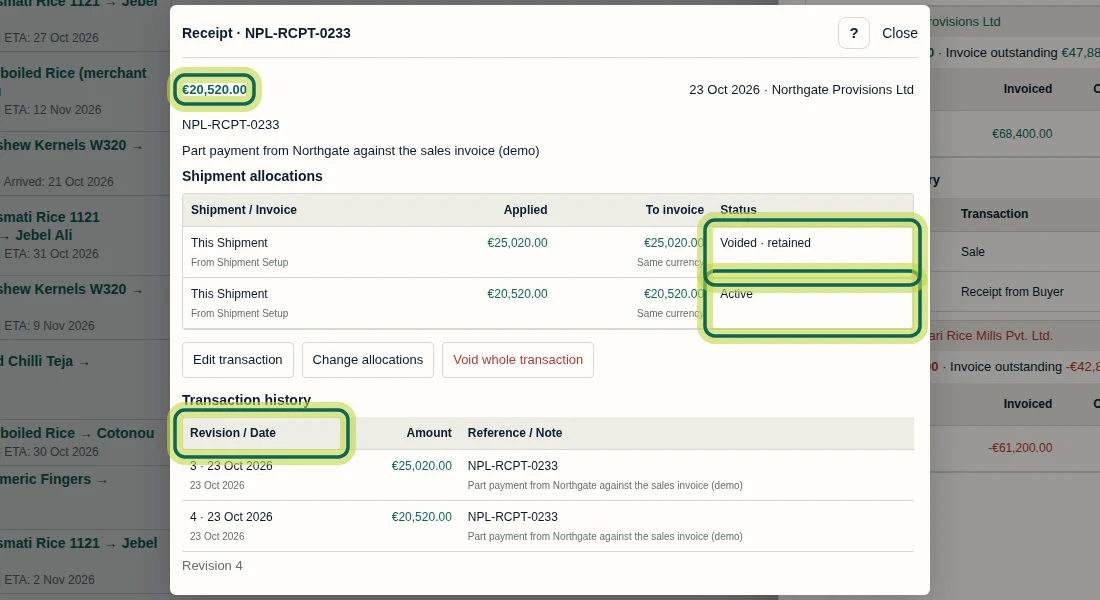
In Edit receipt allocations, choose Manual amounts and keep the intended invoice selected. For this same-currency example, set both Apply (euros) and To invoice (euros) to 20520.00. Select Preview and check Applied 20,520.00 euros, Unallocated 4,500.00 euros and Leaves 47,880.00 euros open, then select Save allocations. Changing allocations does not change the receipt total. Here, the 4,500.00 euros remainder becomes a Shipment advance, shown as Advance held in the receipt details. The previous allocation remains Voided · retained, and the replacement is Active. The receipt total still needs correcting.
Step 3 Correct the receipt total
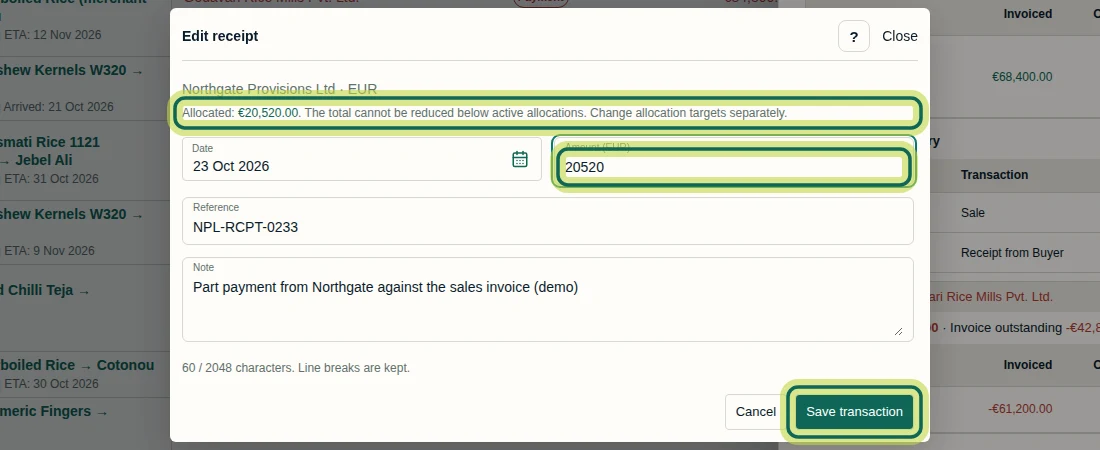
After saving the reduced allocation, select Edit transaction in the receipt details. In Edit receipt, set Amount (euros) to 20520.00. The warning now shows Allocated: 20,520.00 euros, so the new total matches the active allocation. Check Date, Reference and Note, then select Save transaction. For this correction, reducing the total removes the temporary 4,500.00 euros Shipment advance. This revises the recorded receipt; it does not refund or transfer money.
Step 4 Verify the corrected receipt and its history
Reopen NPL-RCPT-0233 from the Sale transaction history. Confirm the receipt total is 20,520.00 euros and the matching allocation is Active. The old 25,020.00 euros allocation remains Voided · retained, and Transaction history shows the earlier and revised totals at Revision 4. Close the details and check the Shipment Ledger: Paid / Received 20,520.00 euros, Invoice outstanding 47,880.00 euros and Net due 47,880.00 euros, with no remaining Shipment advance from this receipt. If a save response is uncertain, reopen the record and inspect the saved values before changing or recording it again.
Step 5 Void the duplicate supplier payment
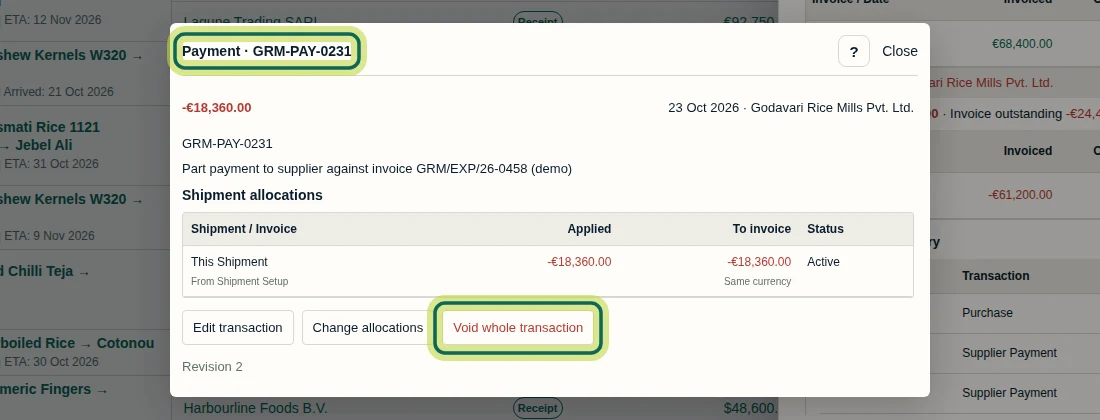
In the Shipment Ledger's Purchase section, expand Transactions +. This example has two Supplier Payment entries for GRM-PAY-0231, each -18,360.00 euros. Verify against your payment evidence which entry is the duplicate, then open that entry's reference. Check the supplier, date, amount and allocations before selecting Void whole transaction. A browser confirmation follows; it was not captured in the screenshot. Its recorded text is: Void the whole payment of -18,360.00 euros? All allocations and the remaining amount are affected; history is retained. Accept the confirmation only for the duplicate. A whole-transaction void affects all its allocations, including any on other shipments. It retains history and does not reverse a bank transfer or refund money.
Step 6 Check the final balances and retained entry
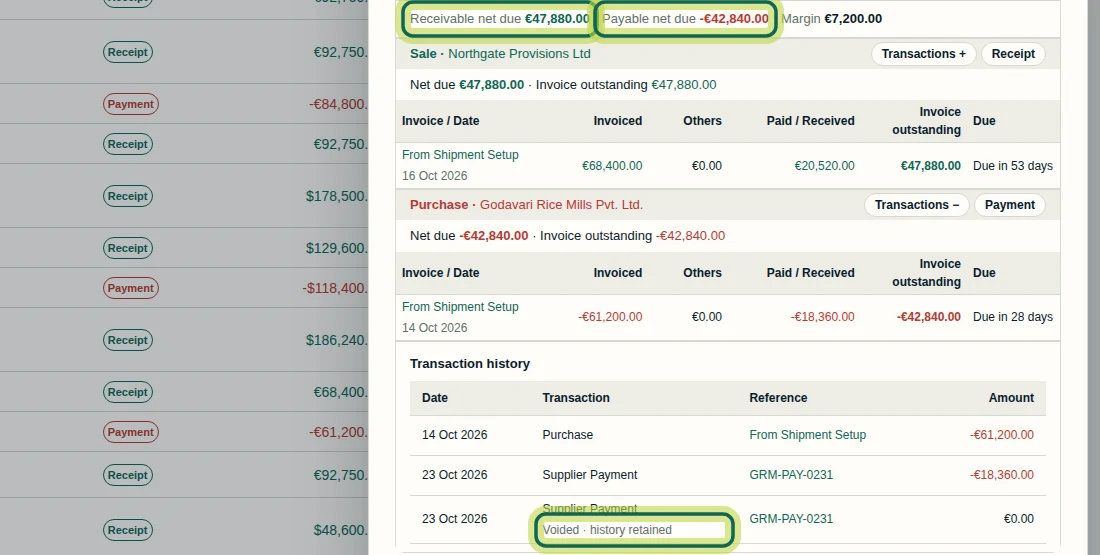
After confirming the void, expand the Purchase Transactions + again. The duplicate Supplier Payment remains visible as Voided · history retained with 0.00 euros. The valid -18,360.00 euros payment remains active, and Payable net due returns to -42,840.00 euros. The corrected sale still shows Paid / Received 20,520.00 euros and Receivable net due 47,880.00 euros. Check your own balances rather than expecting these demo amounts. Select Open full ledger at the bottom of the drawer to review the shipment's entries in full.
Step 7
Expected result
For the recorded example, the receipt total and active allocation are 20,520.00 euros, receivable net due is 47,880.00 euros, and payable net due returns to -42,840.00 euros after voiding the duplicate. Earlier receipt facts and allocations remain in history, and the duplicate payment remains visible as voided with 0.00 euros.
Common issues
- The receipt total cannot be reduced to the intended amount because active allocations are higher.
- Cancel Edit receipt, use Change allocations to reduce the invoice allocation, and save it. Then use Edit transaction to reduce the total without going below the remaining active allocations.
- Reducing the allocation leaves a Shipment advance while Net due stays the same.
- Change allocations leaves the recorded total unchanged. In this shipment receipt example, the 4,500.00 euros remainder is held as a Shipment advance. If the recorded total was wrong, correct it with Edit transaction, then recheck the advance and balances.
- The duplicate payment is still listed after it was voided.
- History is retained. Verify that the duplicate shows Voided · history retained and 0.00 euros, while the valid payment and corrected payable balance remain.
Was this helpful?
If something did not work as described, tell us and we will help.